
FESCO Bill Online – Check & Download Your Electricity Bill (2025)
Haven’t received your electricity bill yet or facing issues getting your FESCO bill on time? No worries — now you can easily check your FESCO bill online and download or print it instantly for payment or record purposes.
At fscobill.pk, you can view your FESCO bill in just a few seconds using either your 14-digit Reference Number or 10-digit Customer ID. Simply enter your details above and get your latest bill instantly.
To learn more, explore this guide for details about FESCO services, coverage areas, peak hours, bill payment methods, and much more.
🔍 Reference Number
🧾 Customer ID
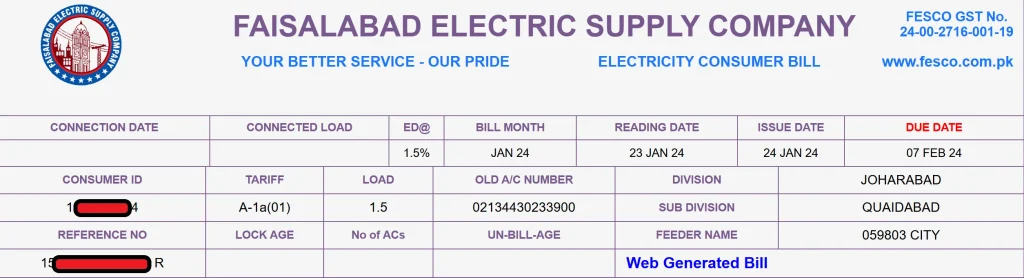
⚡ About FESCO – Faisalabad Electric Supply Company
FESCO (Faisalabad Electric Supply Company) was established in 1998 and operates under WAPDA (Water and Power Development Authority). The company supplies electricity to over 4.96 million customers across a population of 26 million in Punjab, Pakistan.
As one of the most reliable electricity distribution companies in Pakistan, FESCO ensures uninterrupted power supply and smooth billing services across eight major districts of Punjab, under the supervision of NEPRA (National Electric Power Regulatory Authority).
Through fscobill.pk, consumers can check their FESCO Online Bill, download a duplicate copy, and print bills for record or payment purposes — all within seconds.
🏢 Company Overview
| Detail | Information |
|---|---|
| Full Name | Faisalabad Electric Supply Company |
| Category | Electricity Distribution |
| Head Office | Faisalabad, Punjab |
| Owner | Government of Pakistan |
| Employees | 3,000+ |
| Online Portal | fscoebills.pk |
⚙️ FESCO Services
FESCO offers several services to ensure smooth electricity distribution and customer support:
Correction of billing errors and adjustments.
Installation and reading of electricity meters.
Monthly billing and payment processing.
24/7 customer support and complaint resolution.
Efficient distribution and maintenance of power supply across all coverage areas.
💡 FESCO Online Bill – Quick Access for Everyone
Through fscobill.pk, consumers can instantly view their FESCO electricity bill by entering either their 14-digit Reference Number or 10-digit Customer ID.
You can view details such as:
Current bill amount and due date.
Billing history of the last 12 months.
Meter reading, issue date, and taxes.
This portal allows you to view, download, or print your FESCO duplicate bill online anytime, anywhere.
🌍 FESCO Coverage Areas
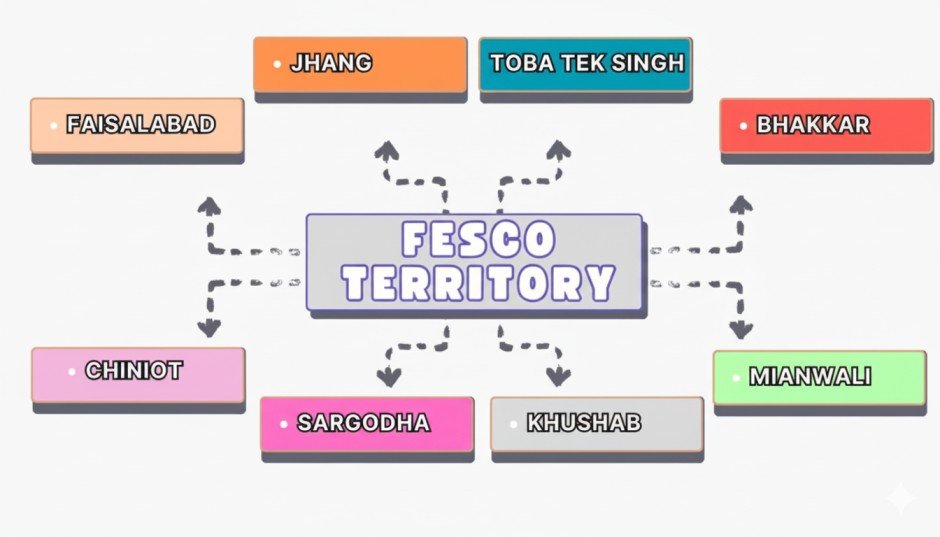
FESCO supplies electricity to the following eight districts in Punjab:
| District | Major Cities Covered |
|---|---|
| Faisalabad | Faisalabad City, Jaranwala, Tandlianwala, Sammundri, Chak Jhumra, Saddar |
| Sargodha | Sargodha City, Bhalwal, Kot Momin, Shahpur, Sahiwal, Bhera |
| Jhang | Jhang City, Shorkot, 18-Hazari, Ahmedpur Sial |
| Toba Tek Singh | Toba Tek Singh City, Kamalia, Pir Mahal, Gojra |
| Bhakkar | Bhakkar City, Darya Khan, Mankera, Kallur Kot |
| Khushab | Khushab City, Quaidabad, Noorpur Thal, Naushera |
| Mianwali | Mianwali City, Isa Khel, Piplan |
| Chiniot | Chiniot City, Lalian, Bhowana |
🔑 Key Features of FESCO Online Bill
✅ Easy Access Anytime – Check your FESCO e-Bill using your Reference Number or Customer ID from anywhere.
📱 Mobile Friendly Interface – Optimized for all devices; check bills seamlessly on your mobile or tablet.
📊 12-Month Bill History – Review previous bills and payment records conveniently online.
📄 Download FESCO Duplicate Bill – Lost your original bill? Download or print your duplicate bill in seconds.
💳 Multiple Payment Options – Pay through mobile banking, Easypaisa, JazzCash, credit card, ATM, or bank branches.
🔔 Bill Alerts & Notifications – Get reminders via SMS or email to avoid missing your due date.
📘 Comprehensive Details – View full tax breakdowns, surcharges, and other charges included in your bill.
🧾 How to Check and Download Your FESCO Bill Online
Visit fscobill.pk.
Enter your 14-digit Reference Number or 10-digit Customer ID.
Click on “Check Bill”.
View your current bill amount, due date, and payment history.
Click “Print Bill” to download or save as PDF.
🖨️ How to Print FESCO Bill Online
Once your bill appears, click the Print icon.
Select “Save as PDF” to download or print directly for payment.
🧾 How to Print Your Tax Certificate
Check your bill using the input box above.
Click on the “Tax Certificate” option beside “Bill”.
Press Print, and your certificate will be generated instantly.
⏱️ FESCO Peak Hours
To balance electricity demand, FESCO has set the following peak hours:
April to October: 6:30 PM – 10:30 PM
November to March: 6:00 PM – 10:00 PM
Using less electricity during these hours helps reduce your total bill and supports energy conservation.
💬 FESCO SMS & Email Services
Stay updated by subscribing to FESCO SMS and Email Alerts. Receive your bill directly on your phone or inbox — no need to wait for a physical copy. You can register for these services through the official FESCO portal.
🎯 FESCO’s Mission
The primary goal of FESCO is to deliver safe, affordable, and reliable electricity across all regions under its jurisdiction. By ensuring efficient operations and modern digital services, FESCO aims to uplift communities and support economic growth in Punjab.
💰 Payment Methods
🔹 Online Payments
Mobile Banking Apps
JazzCash & Easypaisa
Internet Banking & Credit Cards
🔹 Offline Payments
All major commercial and microfinance banks
Pakistan Post Offices
FESCO Customer Service Centers
🧍♂️ FESCO Customer Service Centers
FESCO operates Customer Service Centers across all coverage districts to assist users with:
Billing corrections
New connections
Complaint resolution
Technical assistance
Visit your nearest FESCO office for in-person support and quick issue resolution.
💼 FESCO MIS (Management Information System)
FESCO’s MIS System helps manage billing, connections, and customer complaints efficiently. It supports the organization in maintaining transparency, reliability, and user satisfaction.
💸 Taxes and Charges in FESCO Bill
| Tax/Charge | Description |
|---|---|
| FPA (Fuel Price Adjustment) | Reflects changes in fuel cost for electricity generation. |
| Fixed Charges | A fixed monthly fee based on load capacity. |
| Energy Charges | Cost calculated per electricity unit consumed. |
| GST (General Sales Tax) | Government tax applied on total bill amount. |
| Electricity Duty (ED) | 1.5% of total electricity cost, paid to the government. |
fscobill.pk brings you a fast, easy, and secure way to check your FESCO Online Bill, download duplicate copies, and pay your bill using multiple options — all without leaving your home.
Stay connected, stay powered — check your FESCO bill online today!
Head Office Address
📍 FESCO Head Office, West Canal Road, Abdullahpur, Faisalabad, Pakistan
FESCO Helpline
If you have any questions, emergencies, or complaints, please contact the numbers below. You can also find more details on the FESCO Helpline page.